CRM Automation: What It Is and How It Works
CRM automation is software doing the repetitive work around your customer relationship management (CRM) system, so your team does not copy data by hand.
What CRM automation is
CRM automation is software doing the repetitive work around your customer relationship management (CRM) system, so your team does not copy data by hand.
A CRM holds your contacts, deals, and customer history. On its own, it is mostly a place to store information. Automation is what moves information in and out of it, and what acts on it: creating records, assigning work, sending follow-ups, and keeping other systems in step with the CRM.
The point is not to remove people from selling or support. The point is to remove the manual steps between one system and the next.
What it actually automates
Lead capture. A lead fills in a form, sends a message, or books a call. Automation creates the contact in the CRM, fills in what is known about them, and assigns them to the right rep. Nobody retypes the form.
Routing and follow-up. When a deal changes stage, automation assigns the next task, sends a follow-up, or alerts the owner. If a lead goes quiet, it raises a reminder instead of relying on someone remembering.
Sync between systems. The CRM rarely holds everything. A closed deal should reach accounting so an invoice goes out. A support ticket should reach the customer record so sales sees it. An order should update stock and delivery. Automation moves that data between the CRM and the accounting, ecommerce, support, and email tools, so each system shows the same facts.
Record hygiene. Automation can fill missing fields, standardize formats, and flag duplicates. Clean records matter because every automated step after them depends on the data being right.
Alerts. A deal that has not moved in two weeks, a renewal coming up, or a large order from a new customer — automation can flag these the day they happen, instead of at the next pipeline review.
How it works, step by step
Every automation follows the same shape: something happens, data moves, something happens next.
Example one. A visitor submits a contact form.
The form creates a contact in the CRM, with the source recorded.
The contact is assigned to a rep based on territory or deal size.
The rep gets a task and a notification.
If the rep does not respond in the agreed time, a reminder goes out.
Example two. A deal is marked closed-won.
The CRM sends the deal details to accounting, and an invoice is raised.
Onboarding tasks are created for the delivery team.
The customer gets a welcome message with the next steps.
In both cases, the work is the same work your team already does. Automation just does the moving parts, the same way, every time.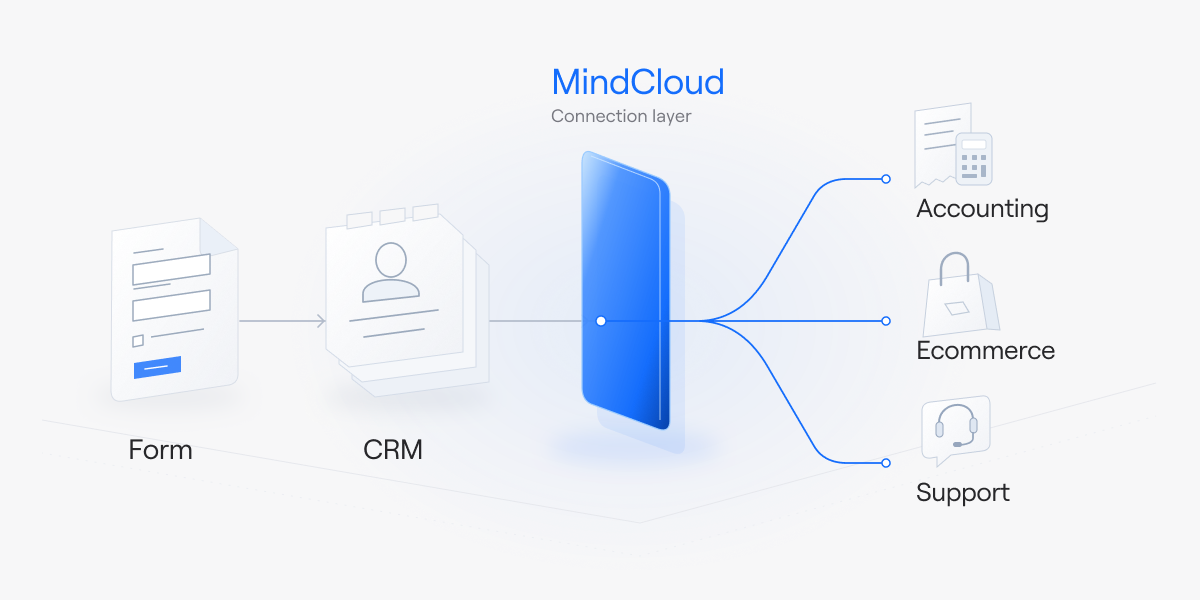
What to automate first
Start where the manual work is heaviest and most repeated:
Lead capture and routing. This is usually the largest pile of manual entry, and it is also where slow handling loses deals.
Follow-up reminders. Missed follow-ups are common and easy to fix with a reminder rule.
Sync with one other system. Pick the pair that causes the most double entry — often CRM and accounting, or CRM and ecommerce — and connect those two first.
Reporting. Once the data flows, a dashboard can show pipeline, response time, and stalled deals without anyone building a spreadsheet.
Fix the process before you automate it. If lead routing is unclear today, automation will route leads the wrong way faster. Agree who owns each stage first, then build the rule.
What we do here
We build the connections and run them. That is the full-service side: we scope the work, build the integrations, and monitor them after launch. You describe the outcome you want — for example, "when a deal closes, accounting and onboarding should already know" — and we build it.
For teams that want to build automations themselves, Cirra lets you describe the automation in plain language, and it builds the workflow from your connected apps. Cirra connects to 3,400+ apps through one connection layer, so the CRM automation can reach the accounting, ecommerce, and support tools around it.
How to tell if it is working
Measure the manual work, not the software:
How long from form submit to first human response?
How many leads sit unassigned at the end of each week?
How often do two systems disagree about the same customer?
How many follow-ups happen on time?
If those move in the right direction, the automation is doing its job. If they do not, the rule or the process needs changing — not more automation.
Where to start
If you are not sure where automation would help most, the Integration Health Check looks at your systems and shows where the manual work sits.