Docs

Changelog

Embedded installation labels and runtime context

MindCloud Embedded installations can now carry customer-specific context through setup, workflow runs, and logs.

  • Build installation labels from setup details such as customer name or email.

  • Validate required setup fields before an embedded workflow is installed.

  • Pass the current installation ID into embedded workflow runs.

  • Filter embedded workflow logs by installation and see installation details in run history.

Rodrigo, Leonardo

AI workflow assistance adds undo, voice input, and safer edits

The AI workflow assistant now gives builders more control during longer workflow-building sessions and safer recovery when a change needs to be reversed.

  • Stop in-progress assistant responses when needed.

  • Dictate prompts with voice input or use keyboard shortcuts to move through assistant actions.

  • Preview and undo recent assistant changes.

  • Ask the assistant to summarize workflow structure as YAML, JSON, tables, diagrams, or PDFs.

  • Apply mapped values, schedules, retry settings, notifications, and Map step edits more consistently.

Angel Montes, Danilo, Leonardo

Flow control supports outcome-specific notifications

Flow control steps can now respond differently when a step succeeds, fails, or returns no results.

  • Configure separate behavior for success, failure, and empty-result outcomes.

  • Send email or Slack notifications with values from previous workflow steps.

  • Deliver flow-control emails to embedded end users when a workflow runs through MindCloud Embedded.

  • Use handled failure details in later workflow steps.

  • Limit repeated flow-control emails so notification failures are easier to reason about.

Leonardo, Rodrigo, Danilo, Gabriel Lobo

HTTP Request steps can be built from cURL

MindCloud now includes an HTTP Request step for calling external endpoints directly from a workflow.

  • Configure method, URL, query parameters, headers, body, redirects, cookies, and retry behavior.

  • Import an existing request from cURL and preview the parsed request before applying it.

  • Send JSON, form data, raw bodies, and common binary body types such as images, PDFs, and compressed files.

  • Use AI assistance while configuring request details.

Danilo, Leonardo

Search, filter, and export workflow run details

Workflow logs and run details now make it easier to investigate large histories, repeated step output, and operational activity.

  • Search inside workflow log steps and highlight matching output.

  • Filter run history by activity while keeping selected filters visible.

  • Export work done, errors, and warnings as CSV.

  • See clearer request URLs, If/Else condition details, duplicate Run Workflow labels, and flow-control notification details in run history.

Lucas, Leonardo, Gabriel Lobo

Workflow schedules support exact run times

Workflow schedules now support precise fixed-time runs and recover better when scheduled work is picked up slightly late.

  • Choose exact schedule times beyond standard quarter-hour options.

  • Ask the AI workflow assistant to create schedules at exact times.

  • Run fixed schedules in the configured time zone.

  • Catch recently due runs without starting duplicate runs for the same scheduled minute.

  • Keep disabled schedule triggers from starting workflow runs.

Angel Montes, Gabriel Lobo, Lucas, Leonardo, Danilo

QuickBooks, Microsoft Excel, Twist, and survey tools expand weekly coverage

This week added a compact set of familiar workplace tools, with finance, spreadsheets, surveys, task management, identity, and messaging represented in the catalog.

Apps added by category:

Communication

  • Twist

Commerce & Finance

  • QuickBooks Online

Productivity

  • Samedi

  • SurveySparrow

  • Toodledo

Content & Files

  • Microsoft 365 Excel

Support & Service

  • Ticketbud

Data & Analytics

  • LinkedIn Ads Reports

Developer & IT

  • myUplink

  • Yandex ID

MindCloud Team

Zoho, Apollo, Webex, and team workflow apps join MindCloud

MindCloud added a focused set of team and business apps this week, including CRM, scheduling, support, collaboration, reporting, and spreadsheet workflows.

Apps added by category:

Communication

  • Cisco Webex Meetings

  • Zoho Cliq

  • Zoho Mail

Sales & CRM

  • Apollo

Commerce & Finance

  • i2i

  • Whop

  • Zoho Backstage

Productivity

  • Attio

  • Google Tasks

  • Polaria

  • Qntrl

  • Raindrop

  • Zoho Bookings

  • Zoho Projects

  • Zoho Sheet

Support & Service

  • Explara

  • Zoho Assist

Developer & IT

  • 1Shot API

Website & App Building

  • Zoho PageSense

MindCloud Team

FTP and SFTP steps add timeouts, retries, and reusable downloads

FTP and SFTP workflow steps now handle common file operations with better timeout, retry, and cleanup behavior.

  • Download file content in a format that can be passed to later workflow steps.

  • Retry uploads after temporary failures.

  • Time out list, upload, download, rename, and close operations instead of hanging indefinitely.

  • Report file operation errors more consistently.

Lucas

Step retries can target status codes and transient failures

Workflow builders can now configure how failed step attempts should be retried.

  • Set retry attempts, base delay, multiplier, and retryable response status codes.

  • Retry on any error when a step needs broader recovery behavior.

  • Respect rate-limit reset timing when an external service provides it.

  • Cap long retry delays so failed steps do not wait for hours between attempts.

  • Inspect retry attempts from workflow run details.

Danilo, Leonardo

MindCloud Embedded adds SDK-powered installation flows

MindCloud Embedded now includes a browser SDK and installation flow for customer-facing integrations.

  • Launch an integration modal from another product.

  • Let end users install, authenticate, deactivate, and reactivate integrations.

  • Notify the host application when an embedded integration finishes connecting.

  • Share installation links and keep users in setup until the current installation is complete.

  • Close embedded OAuth windows more reliably after authentication.

Rodrigo, Gabriel Lobo, Leonardo

Connections, apps, and actions are faster to find while building

MindCloud now keeps connection setup closer to the workflow builder and makes app and action search more forgiving.

  • Create and edit connections from workflow setup, the home dashboard, and the connections page.

  • Return to MindCloud more reliably after connecting an account.

  • Search app and action names with partial matches and small spelling differences.

  • Keep the best connection match visible while searching app options.

Danilo, Leonardo

The first major MindCloud app wave lands

This was the week MindCloud started to feel like a real app catalog. More than one thousand apps were added across productivity, developer infrastructure, commerce, marketing, communication, data, files, support, HR, AI, and public utility workflows.

Apps added by category:

Read full article
MindCloud Team

Workflows can store and reuse key-value data

MindCloud now includes a Key/Value Storage utility step for saving reusable workflow data.

  • Save a value by namespace and key from a workflow.

  • Retrieve saved values in later steps or future workflow runs.

  • Store plain text or structured values and use the retrieved result downstream.

Leonardo

Commerce tracking and PDF generation join the app catalog

This week added two practical building blocks: TrackMage for commerce and delivery visibility, and PDF Maker for workflows that need generated documents as part of the process.

Apps added by category:

Commerce & Finance

  • TrackMage

Content & Files

  • PDF Maker

MindCloud Team

Workflow editor canvas navigation for large workflows

The workflow editor canvas now handles large workflows with smoother navigation and clearer step controls.

  • Pan, zoom, and reset the workflow canvas.

  • Use keyboard shortcuts for common workflow actions.

  • Work with color-coded step categories, clearer trigger badges, and add-step-before controls.

  • Navigate large workflows more smoothly with virtualized canvas steps.

  • Drag, select, comment, and collapse steps more predictably.

Danilo, Leonardo

SQL steps support BigQuery and Azure service principal connections

SQL workflow steps now support more enterprise data environments with clearer setup validation.

  • Run Google BigQuery queries from a workflow using a service account.

  • Choose the BigQuery region and pass parameters into queries.

  • Connect to Azure SQL with service principal details.

  • Test supported SQL connections and see clearer query failure messages.

Lucas, Leonardo, Danilo

CSV, ZIP, and file conversion utilities for workflows

MindCloud now gives workflow builders more tools for file responses and structured data.

  • Convert CSV input into structured rows with configurable headers and empty-line handling.

  • Zip, unzip, compress, and decompress files inside workflows.

  • Convert file data between base64, raw text, URL sources, and file-ready output.

  • Handle XML, large encoded files, and file upload actions more consistently.

Leonardo, Danilo

Workflow requirement blueprints can be shared with collaborators

Workflow requirement blueprints help teams collect implementation details before a workflow is built.

  • Complete a guided requirements wizard with apps, triggers, field mapping, sample records, and volume expectations.

  • Attach sample files to mapping resources.

  • Share a requirements link with collaborators outside the workspace.

  • Copy blueprint details as Markdown and request follow-up answers when more detail is needed.

Ricardo, Lucas, Leonardo

Embedded installation management at scale

MindCloud Embedded now gives teams clearer controls for customer-facing integration installations.

  • Browse installations with search, pagination, connected app details, and creation dates.

  • Pause, resume, uninstall, reinstall, delete, and edit installation details.

  • Open related workflow logs from an installation.

  • Scope workflow memory values by installation so each customer setup keeps the right saved values.

  • Hide default footer branding in embedded integration modals when a white-labeled experience is needed.

Ricardo, Danilo, Rodrigo, Leonardo, Lucas

Webhook testing and replay for busy workflows

Webhook-triggered workflows now move through busy periods with less waiting and better tools for testing or replaying requests.

  • Send test webhook requests with method, query parameters, headers, body content, and sample data.

  • Rerun eligible webhook requests from workflow logs.

  • Replay requests against the latest published workflow.

  • Pick up high-volume webhook runs more efficiently while preserving order.

Gabriel Lobo, Danilo, Leonardo

Workflow drafts now autosave while editing

Workflow drafts now save automatically while builders work, making it easier to recover recent changes.

  • Autosave draft changes in the workflow editor.

  • Review recent autosaves from a dedicated side panel.

  • Restore a previous autosave when needed.

  • Keep scheduled workflow timing intact when restoring from autosave or snapshot history.

Leonardo

Clearer loop data for nested workflow steps

Loop-heavy workflows now expose the data builders expect when configuring later steps.

  • Inspect nested Iterate step data, counts, hover values, and output previews.

  • Show the selected loop item in Map and Group steps instead of the full list.

  • Keep Iterate step outputs available while configuring downstream steps.

  • Use clearer labels for array-mapped fields in the variable picker.

Leonardo, Danilo

Create reusable functions from workflow steps

Workflow builders can now turn selected steps into reusable functions and inspect function activity from workflow output.

  • Convert selected workflow steps into a reusable function from the editor.

  • Open function run logs while reviewing workflow output.

  • Keep function inputs formatted as arrays and objects during tests and live runs.

  • Duplicate workflows while preserving reusable function references.

Danilo, Leonardo, Gabriel Lobo

Map steps get a larger workspace and AI editing support

Map steps now have a larger editing workspace for building, testing, and refining transformations.

  • Open Map editing in a dedicated modal with input and output previews.

  • Review complex data with an expandable JSON viewer.

  • Ask the Map step AI assistant to generate or improve transformation logic.

  • Review AI-proposed changes, adjust selected inputs, and run Map tests from the assistant flow.

Lucas, Danilo, Leonardo, Angel Montes

New utility steps for encryption and grouped outputs

MindCloud added workflow utility steps for encrypting data and combining outputs from multiple earlier steps.

  • Encrypt workflow values with PGP before sending them to another system.

  • Combine selected step outputs into one grouped result.

  • Flatten grouped results or hide empty results when they are not needed.

  • Use the generated utility output in later workflow steps.

Leonardo, Danilo

Workflow filters and If/Else branches are more predictable

Filters and branching logic now behave more consistently across transforms, loops, duplicated steps, and repeated runs.

  • Keep If/Else branch results aligned with the branch that actually ran.

  • Apply advanced filters correctly in Transform steps.

  • Filter records by values inside repeated list items.

  • Skip incomplete filter rows without blocking valid rules.

  • Preserve nested filter logic when If/Else steps are duplicated.

Danilo, Leonardo

Workflow logs include summary charts and activity filters

Workflow logs now include a summary view for recent runs, trends, and activity.

  • Search workflow logs by text.

  • View summary charts for selected date ranges.

  • Filter workflow logs by activity or by specific hours within a date range.

  • See assigned workflow size details more clearly in run history.

  • Move through log timelines with clearer controls.

Ricardo, Leonardo, Gabriel Lobo

NetSuite setup supports custom sublists and richer records

NetSuite workflow steps now support richer record structures while making setup and troubleshooting clearer.

  • Browse custom records, saved searches, sublists, and subrecords while configuring steps.

  • Create and update NetSuite records with custom fields, sublists, and subrecords.

  • Map sublists and subrecords from previous workflow steps.

  • See clearer setup guidance when permissions, deployments, or record features need attention.

  • Load large NetSuite record structures faster in setup flows.

Danilo, Lucas, Ricardo

Embedded integrations can collect custom installation details

MindCloud Embedded integrations can now define custom details to collect and store with each installation.

  • Add labeled custom fields to an embedded integration.

  • Choose the data type for each custom detail.

  • Update custom details from embedded installation flows.

  • Use custom installation details in workflow setup and mapped values.

Rodrigo, Leonardo

Notification emails can use custom sender addresses

Customer-facing notification emails can now be sent from a configured sender address.

  • Connect SendGrid from notification settings.

  • Choose which verified sender email MindCloud should use for notification delivery.

  • Use reply-to and additional recipient options for notification emails.

  • See clearer error details when a notification send fails.

Rodrigo

AI-generated workflow summaries with exports and issue checks

AI-generated workflow summaries give teams a clearer way to review what a workflow does and where it may need attention.

  • Generate and regenerate readable workflow summaries from the editor or workflow list.

  • Review potential workflow issues and retry or skip individual checks.

  • Export summaries to PDF with selected sections.

  • Review glossary terms, workflow structure, and related code changes from the summary view.

Angel Montes, Leonardo, Ricardo

Turnkey integrations can be launched from MindCloud

MindCloud now has a dedicated Turnkey Integrations area for installing and managing prebuilt integration workflows.

  • Browse available turnkey integrations from a dedicated screen.

  • Install or manage integrations from integration cards.

  • Enable turnkey integrations from workspace settings.

Rodrigo

Embedded installation flows add credential exchange and setup fields

MindCloud Embedded setup now supports signed credential exchange and per-installation setup values.

  • Set up credential exchange with signed requests.

  • Manage multiple installations for the same integration.

  • Collect workflow setup fields inside the embedded integration modal.

  • Save installation-specific setup values and use them when embedded workflows run.

Ricardo, Danilo, Rodrigo, Leonardo

Embedded workflows can run for each end user

MindCloud Embedded now supports workflow runs and logs for each connected end user.

  • Run embedded workflows for a specific end user.

  • Schedule embedded workflows for end users.

  • Filter embedded workflow logs and charts by end user.

  • Configure which app powers embedded integrations for a workspace.

Rodrigo, Ricardo, Leonardo

Webhook workflows support custom URLs and custom responses

Webhook workflows now support more flexible request routing and response handling.

  • Configure custom webhook URLs for workflow triggers.

  • Capture dynamic values from webhook URL paths.

  • Return plain text or custom response bodies from webhook workflows.

  • Keep response options clear when a workflow needs to respond immediately.

  • Generate a new webhook URL automatically when a workflow is duplicated.

Rodrigo, DC, Danilo, Lucas, Leonardo

Embedded integrations can be managed in MindCloud

MindCloud now has a dedicated area for managing embedded integrations and their related workflows.

  • Open integration details from the embedded integrations list.

  • Add or remove workflows from an integration.

  • Choose which apps are available for an integration.

  • Navigate back to an integration from related workflows.

Rodrigo, Leonardo

Workflow size can be managed automatically or manually

MindCloud can now size workflow runs more precisely, with automatic sizing and manual overrides in workflow settings.

  • Automatically evaluate workflow size from recent run behavior.

  • Set a workflow to Automatic, XS, SM, MD, or XL when it needs a specific memory allocation.

  • Run larger workflows with resources that better match their memory needs.

  • See whether a workflow size was chosen automatically or set manually.

Rodrigo

Break steps can stop a workflow branch

Workflows now include a Break flow-control step for stopping a branch when no more work should run.

  • Stop a branch without treating the entire workflow as failed.

  • Use Break in no-results and failure paths.

  • Keep later steps from running when a branch has nothing else to do.

Leonardo

Step output and errors show better debugging context

Workflow builders now have more context when testing steps or investigating a run.

  • Review step configuration separately from returned data.

  • Use a step's own output when configuring transforms and completion behavior.

  • Run step tests with the latest setup values and selected environment.

  • See clearer step details when uploads, downloads, required fields, or setup errors fail.

Lucas, Ricardo, Leonardo, Danilo, Rodrigo

Google Sheets row setup supports dynamic values

Google Sheets row setup now handles dynamic values and manual columns more reliably.

  • Preserve dynamic values in row cells when a workflow runs.

  • Send rows in the format Google Sheets expects.

  • Save empty or manually added columns more reliably.

Ricardo, Leonardo

Apps now support sorting

MindCloud provides a rich interface for executing workflow steps.

Until now, you could paginate and filter data from your connections with just a few clicks.

Now, sorting has joined the party!

All apps and actions that support sorting will have a new "Sorting" section in the step configuration.

Danilo

Advanced logic and filtering

We've added complex logic and filtering abilities to three areas in our workflow builder:

  • Step filters

  • Post-processing filters

  • If/Else steps

This allows you to create multiple AND/OR conditions, nested conditions, and more—whether you're getting data from your connection or controlling the flow of your workflow.

Danilo

MindCloud is now fully responsive across all devices

We're excited to announce that our platform is now fully responsive! You can now access and manage your workflows, apps, and integrations seamlessly across all devices.

What's New

  • Mobile-optimized interface that adapts to any screen size

  • Touch-friendly controls for tablets and smartphones

  • Improved navigation for smaller screens

  • Enhanced mobile performance and loading speeds

Whether you're on your desktop, tablet, or phone, you'll have the full power of MindCloud at your fingertips. Build and monitor your integrations from anywhere!

Danilo, DC

Introducing tutorials

Along with a brand-new home screen and onboarding experience, we're proud to release interactive tutorials.

These tutorials will guide you through building your first workflow and walk you through the various features our platform offers.

We've started with five tutorials, and this number will grow rapidly. Try them out!

Danilo, DC, Lucas, Rodrigo, Ricardo

Improved signup process

We've made much needed improvements to the signup flow. In addition to a smoother experience, you can now create your organization during signup and we collect some basic information to help AI tailor your experience.

Danilo, DC, Lucas

DropBox, Bill.com, Lessen and Smartsheet apps are live

We're happy to add 4 new apps to our roster this week:

  • Dropbox - File sharing and collaboration

  • Bill.com - Business payments and invoicing

  • Lessen - Real estate property management

  • Smartsheet - Work management that adapts to your needs

Need a new app? Reach out to us and we'll get building!

Leo

Collaborate on your workflows with comments

Step Comments

When building workflows, collaboration is key. You often need to discuss specific steps with your team members, ask questions, or provide context. Until now, this meant switching between different communication tools, which was inefficient.

With Step Comments, you can now add comments directly to any step in your workflow. Simply click on a step and start a conversation right where it matters most. Need to get someone's attention? Mention them using @ and they'll be notified instantly through their email.

Step Comments aren't just for questions. Use them to document complex decisions, explain your logic, or leave notes for future reference! 💬

Ricardo

Build your workflow with environments

Workflow Environments

When building workflows, you may need to first run the same workflow in a sandbox, connecting to all of your sandbox app accounts. Then, when you're ready to go live, you switch all connections to production. This process was quite tedious until now.

With Environments, you can configure your triggers to run the workflow one or more times, each time using a different environment. Your connections can be tagged by environment, so every time the workflow runs, it connects to different accounts.

Environments aren't limited to sandbox and production. Need to build a workflow that connects to 20 different tenants? Create 20 environments! 🚀

Ricardo, Lucas

Run workflows from within workflows

Sometimes, you need to run a workflow only after you have completed a previous one. For example, you might need to sync all Purchase Orders between two systems—but only after you have ensured that all Customers have been synced.

This is now possible! We have added a new app, called Run Workflow, which lets you trigger another workflow run at any point.

Rodrigo

Quickly access anything with the Command Bar

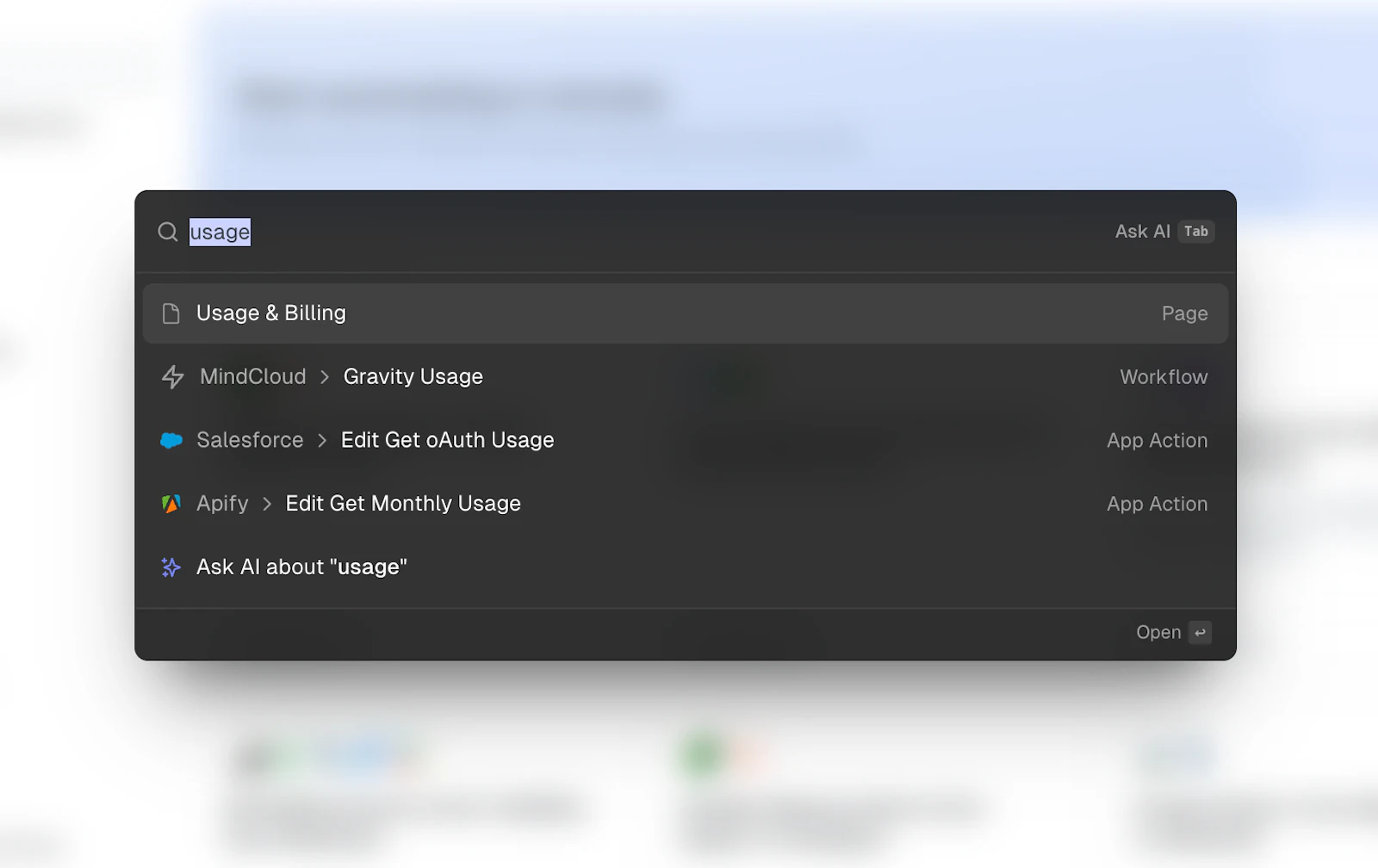
Every worthwhile platform should have a Command + K bar, and now MindCloud does too!

Command Bar

Press Command/Control + K to search for any workflow, setting, or page across all your organizations, or to ask AI about something.

Leonardo, Danilo, DC

App for sending cURL requests

If you have a cURL string you'd like to use to make an HTTP request in a workflow, you can now use the cURL app. Simply paste in the cURL text and run the step!

DC, Leo

VirtueScript, Truce, ServiceChannel and Zenoti apps live

We're excited to announce the release of four new connector apps on the MindCloud platform:

  • VirtueScript – A pharmaceutical management platform

  • Truce Software – Mobile solutions for safety and productivity

  • ServiceChannel – Facilities and store operations management

  • Zenoti – A spa and salon management platform

Leo

MindCloud has a changelog

Visit this page for the latest updates and changes to MindCloud's integration platform!

Danilo, DC