EDI 997: What It Is and How It Works
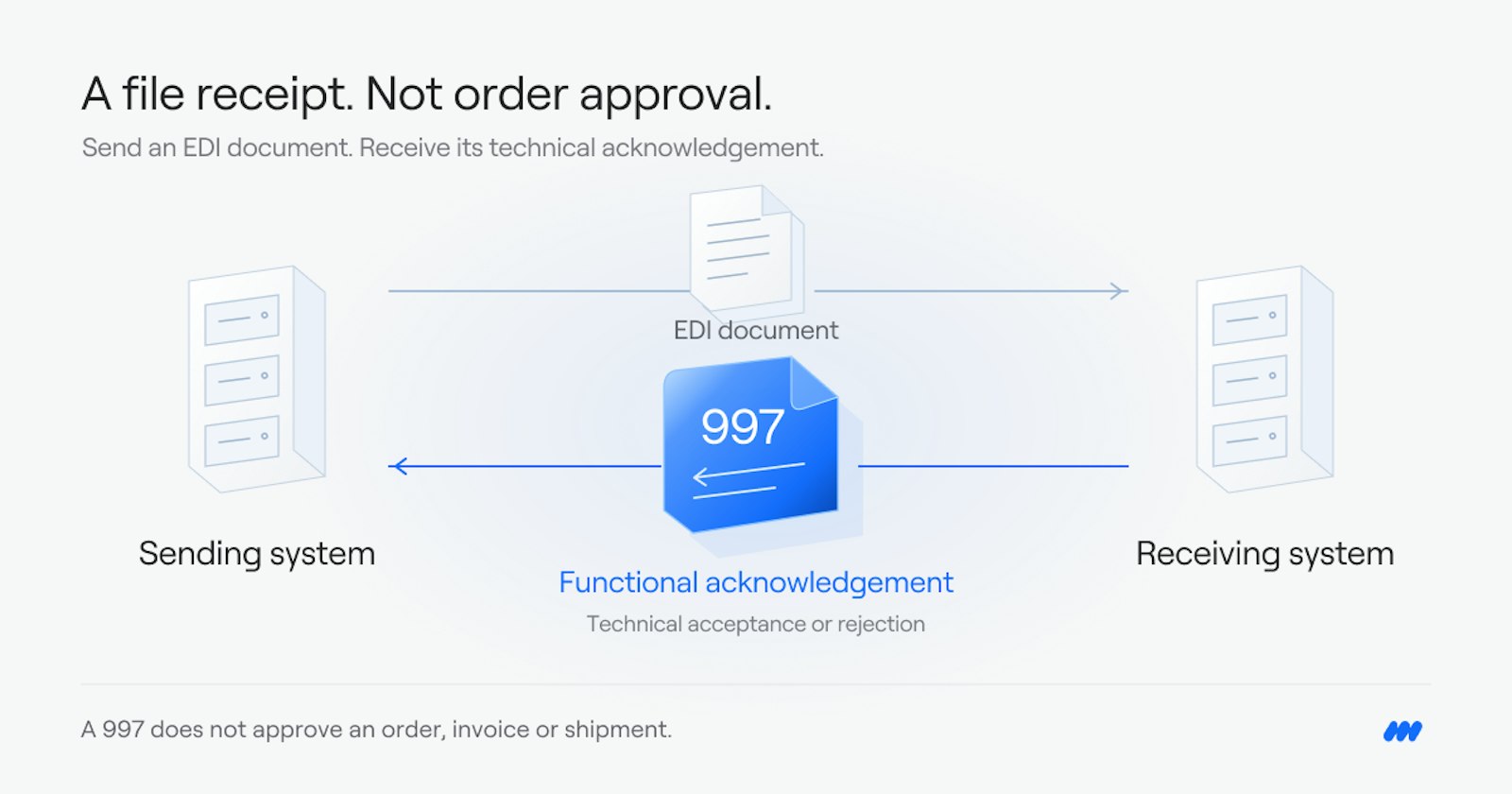
A 997 is the Functional Acknowledgement: the file the receiver of an EDI document sends back to say it arrived and whether it was accepted. You send one for every file you receive, and your partners send one for every file you send.
What an EDI 997 is
EDI means Electronic Data Interchange. It is how businesses send orders, invoices, and shipping notices to each other as structured computer files, instead of email or paper.
A 997 is the Functional Acknowledgement. Whoever receives an EDI file sends one back: when a trading partner sends you a file, your system creates a 997 and sends it to them, and when you send a file, your partner sends a 997 back to you. It says, in structured form: we got your file, and here is whether we accepted it.
It is a receipt, not a business reply. A 997 does not confirm an order, approve an invoice, or promise a shipment. It only confirms that the EDI file arrived and could be read.
What a 997 contains
A 997 answers at two levels.
The functional group. This is the batch of documents sent together, for example a set of purchase orders. The 997 says whether the group as a whole was accepted, accepted with errors noted, partly accepted, or rejected.
Each transaction inside the group. For each document, the 997 gives a response code:
A — Accepted. The document passed checks.
E — Accepted, but errors were noted. The document was taken in, but something in it needs attention.
P — Partially accepted. Some parts passed, some did not.
R — Rejected. The document was not accepted and needs to be fixed and resent.
When there is an error, the 997 points to where it is: which segment and which data element caused the problem, and what kind of error it was. That is what makes a 997 useful. Without it, a sender would not know a document had failed until a partner asked where it was.
How it fits in a normal EDI exchange
A typical exchange looks like this:
A buyer sends a purchase order, an EDI 850.
The seller's system sends back a 997. This confirms the 850 arrived and passed checks.
Later, the seller sends a shipping notice, an EDI 856, when the order ships.
The buyer sends back a 997 for the 856.
Each side sends a 997 for every file it receives, so your system has two jobs: create and send a 997 for each file your partners send you, and watch for the 997s that come back for the files you send. If a 997 never arrives for a file you sent, you cannot assume the document was received. That is the first thing to check when a partner says they never got an order or an invoice.
What to do when a 997 comes back rejected
Start with the error details in the 997, not with resending the same file. The 997 names the segment and element that failed. Common causes are a missing required field, a value in the wrong format, or a code the receiver does not recognize.
Fix the problem at its source, then resend the corrected document. If the same error keeps coming back, the problem is usually in how the document is built, not in the sending step. That is worth fixing once, rather than resending the same file and getting the same rejection.
Also check the response code carefully. An "accepted, but errors noted" result is easy to miss, because the document was taken in. Errors noted there can still cause problems later, for example at invoicing or payment, so they should be reviewed even though nothing was rejected outright.
What we do here
We build EDI connections and run them. That means we set up the document types a partner requires, including the 997s you send back for every file you receive and the ones you expect back for every file you send, and we monitor the exchange after launch so a rejected or missing acknowledgement is caught early.
For teams that want to build these connections themselves, Cirra lets you describe the work in plain language, and it builds the workflow from your connected apps. Cirra connects to 3,400+ apps through one connection layer, so an EDI exchange can reach the ordering, accounting, and shipping tools around it.
Where to start
If you are not sure where EDI would help most, or where documents are failing today, the Integration Health Check looks at your systems and shows where the manual work and the failed exchanges sit.
See also: EDI Explained.