iPaaS Examples: What an Integration Platform Actually Does
iPaaS means Integration Platform as a Service. It is a cloud platform for connecting apps and moving data between them, without building a separate connection for every pair of apps by hand.
What iPaaS means
iPaaS means Integration Platform as a Service. It is a cloud platform for connecting apps and moving data between them, without building a separate connection for every pair of apps by hand.
In plain terms: instead of your team writing code to connect app A to app B, then more code to connect app B to app C, and so on, the apps connect through one platform. You choose the apps, map the fields, and set the rules for when data moves. The platform handles the transfer, the format changes, and the error handling.
Examples by workflow
The clearest way to understand iPaaS is by workflow, not by feature list. Here are common examples.
Lead to customer. A lead fills in a form. The platform creates the contact in the CRM (Customer Relationship Management system), assigns it to a rep, and creates a follow-up task. If the lead becomes a customer, the platform creates the same customer in accounting, so invoicing can start without anyone retyping the details.
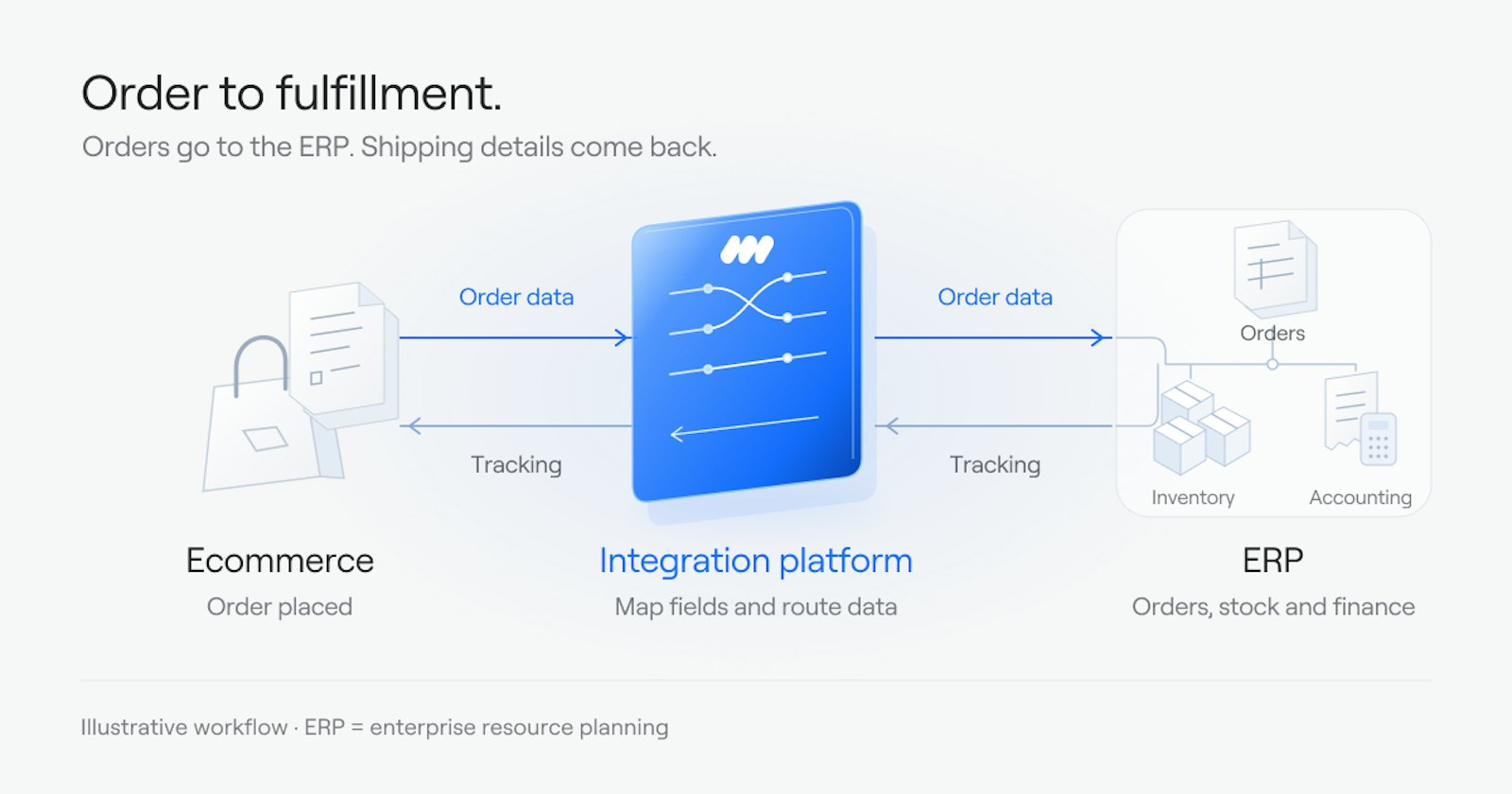
Order to fulfillment. An order is placed in an ecommerce system. The platform sends the order to the ERP (Enterprise Resource Planning system), where it is recorded and fulfilled. When the order ships, the platform sends tracking details back to the ecommerce system and to the customer.
Support to sales. A support ticket is opened. The platform links it to the customer record in the CRM, so sales can see it, and sends an alert if the customer is a large account or the issue is urgent.
Data in step across systems. A customer changes address in one system. The platform sends the change to the other systems that hold that customer, so each system shows the same address. Without this, the same customer ends up with different details in different systems, and reports built on that data are wrong.
Reporting without spreadsheets. Once data flows through the platform, it can feed a dashboard: pipeline, response time, stalled deals, or order status, without anyone exporting files and building a spreadsheet by hand.
Examples by who builds it
iPaaS can be used in two main ways.
Built in-house. A company's own team uses the platform to build its connections. This suits teams that have the time and skills to build and maintain integrations, and want control over each workflow.
Built and run as a service. A service team builds the connections on a platform and runs them after launch, including monitoring and fixing failed transfers. This suits companies that need the connections but do not have an in-house team to build and maintain them.
The platform is the same kind of tool in both cases. The difference is who does the building and the ongoing running.
What iPaaS does not do
iPaaS does not fix a broken process on its own. If lead routing is unclear today, or if two systems disagree about the same customer, connecting them will move the same problem faster. Fix who owns each step and which system holds the truth for each piece of data first, then build the connection.
It also does not remove the need to check the specific apps you use. A platform can connect to many apps and still need extra work for one core app, if that app's connector is shallow or if a key system still runs on your own servers. In that mixed case, a hybrid platform, which connects cloud and on-premise systems, is the better fit.
What we do here
We build integrations and run them. That is the full-service side: we scope the work, build the connections, and monitor them after launch. You describe the outcome you want, for example "when a deal closes, accounting and onboarding should already know," and we build it.
For teams that want to build integrations themselves, Cirra lets you describe the work in plain language, and it builds the workflow from your connected apps. Cirra connects to 3,400+ apps through one connection layer, so an integration can reach the CRM, accounting, ecommerce, and support tools around it.
Where to start
If you are not sure which workflows to connect first, or where manual work is piling up between your apps, the Integration Health Check looks at your systems and shows where the manual work sits.