Hybrid Integration Platform: What It Is and How It Works
A hybrid integration platform connects systems that live in different places: some in the cloud, and some on a company's own servers.
What a hybrid integration platform is
A hybrid integration platform connects systems that live in different places: some in the cloud, and some on a company's own servers, often called on-premise systems.
Many companies are in this mixed position. They use cloud tools for sales, marketing, or support, while their core system, for example an ERP (Enterprise Resource Planning system) or a warehouse system, still runs on their own servers. A hybrid platform is built to connect both sides, so data can move between a cloud app and an on-premise system without rebuilding each connection by hand.
The word hybrid refers to where the systems live, not to the platform itself. The platform can run in the cloud and still reach on-premise systems through a secure connection.
How it differs from a cloud-only platform
A cloud-only integration platform is made to connect cloud apps to each other. That works well when every system is in the cloud.
It runs into trouble when a key system is on-premise, behind a company firewall, or only reachable inside a private network. In that case, a cloud-only tool may need extra work, custom code, or a separate connection to reach it.
A hybrid platform is made for that mixed case from the start. It can:
Connect cloud apps to each other.
Connect cloud apps to on-premise systems.
Connect on-premise systems to each other, through the same platform.
That matters because the hardest system to connect is often the one that holds the most important data, and that system is often the one still on-premise.
What it actually does
Like other integration platforms, a hybrid platform moves data between systems and runs workflows across them. A typical example:
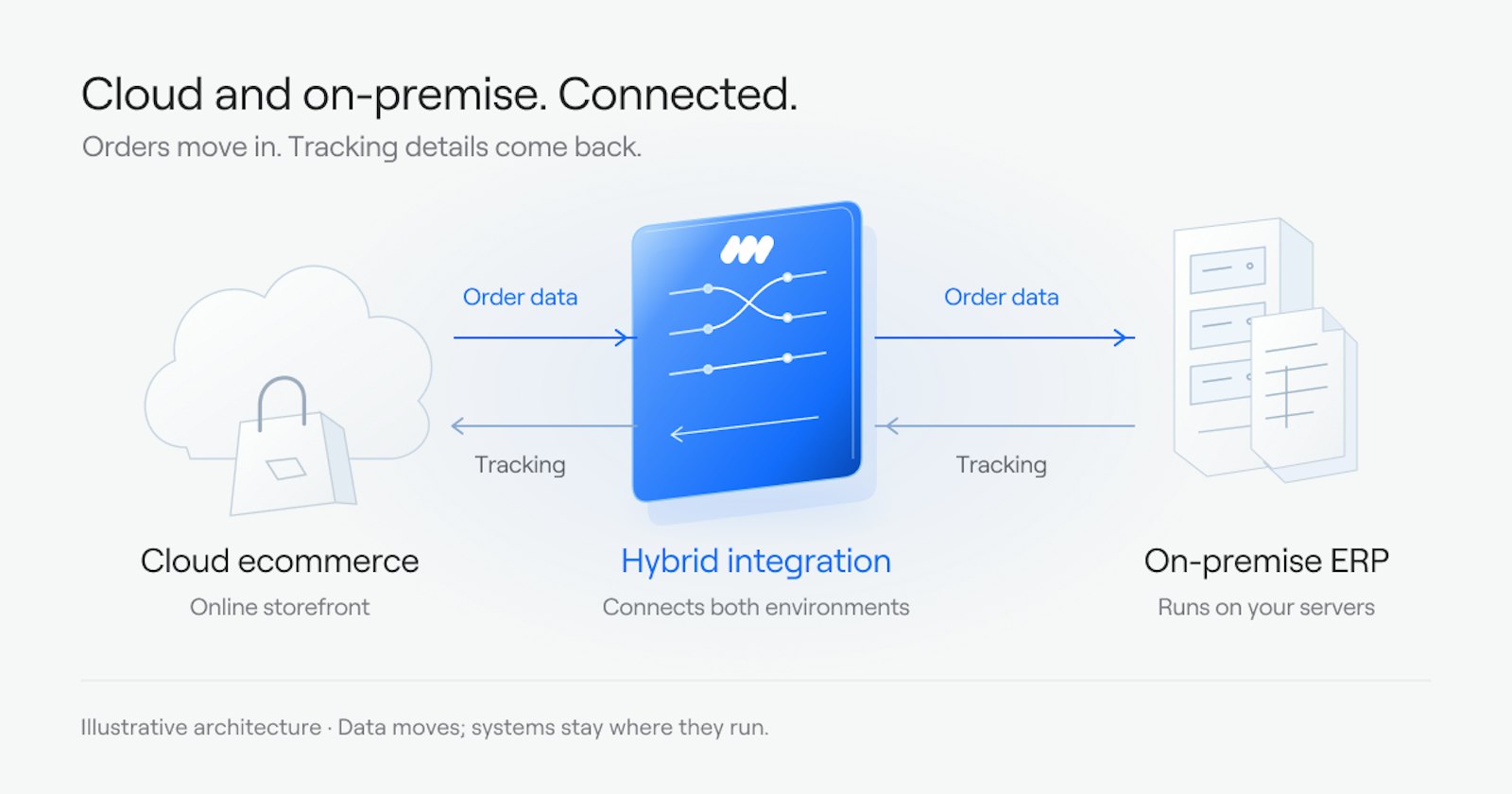
An order is placed in an ecommerce system in the cloud.
The platform sends the order to the on-premise ERP, where it is recorded and fulfilled.
When the order ships, the platform sends tracking details back to the ecommerce system and to the customer.
Other common examples are syncing customers between a CRM (Customer Relationship Management system) and an accounting system, or keeping stock levels in step between a warehouse system and a storefront.
The platform also handles the parts that are easy to miss: checking that data is in the right format, retrying a failed transfer, and logging what moved and when, so a failed transfer can be found and fixed.
When a hybrid platform is the right fit
A hybrid platform is worth considering when:
At least one core system runs on-premise and is not moving to the cloud soon.
Data needs to move between that system and cloud apps on a regular basis.
The team does not want to build and maintain a separate connection for every pair of systems.
If every system is already in the cloud, a cloud-only platform may be enough. If the company plans to move everything to the cloud in the short term, it may make sense to wait and connect the new cloud systems directly. The hybrid case is the middle ground most companies are actually in: some systems moved, some have not, and work still needs to flow between them.
What we do here
We build integrations and run them. That means we scope the work, build the connections between cloud and on-premise systems, and monitor them after launch so a failed transfer is caught early.
For teams that want to build these connections themselves, Cirra lets you describe the work in plain language, and it builds the workflow from your connected apps. Cirra connects to 3,400+ apps through one connection layer, so a hybrid exchange can reach the ordering, accounting, and warehouse tools around it.
Where to start
If you are not sure which systems need connecting first, or where manual work is piling up between cloud and on-premise systems, the Integration Health Check looks at your systems and shows where the manual work sits.